A red dot sight may look clear at 1x but appear soft, stretched, doubled, or uneven when viewed through a magnifier. Before blaming either optic, identify what has actually changed.
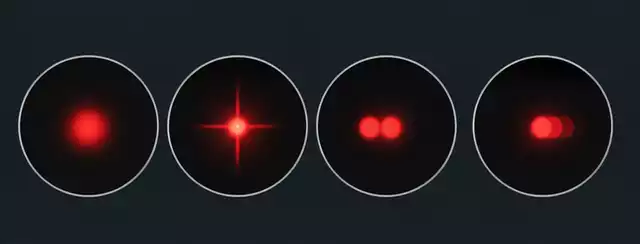
A soft dot, a dot with spikes, two visible dots, and a dot that changes as your eye moves are different observations. They can overlap, and none identifies a cause on its own.
A magnifier adds another optical system, with its own focus setting, optical characteristics, and eye-position requirements. The sight’s brightness, the original reticle image, and individual vision can also affect what you see. Understanding these factors makes troubleshooting more effective than immediately replacing a component.

Four Things People Call “Blurry”
The word blurry often describes several different visual problems. Identifying the symptom helps determine what to check next.
| What you see | Possible contributors | First check |
| A soft dot | Focus mismatch, visual factors, or optical limitations | Check focus and compare the sight without the magnifier |
| Spikes or a tail | Excessive brightness, visual factors, or optical aberrations | Reduce brightness and compare both configurations |
| Two dots | Internal reflections or other optical interactions | Check whether the second image changes with viewing angle |
| Movement or shape changes | Parallax, off-axis aberrations, or vignetting | Center your eye and compare the image across the viewing window |
These are troubleshooting clues, not diagnoses.
A Soft Dot
A soft dot has indistinct edges and lacks a crisp appearance. Check the magnifier’s focus adjustment, if available, then compare the reticle without magnification.
A Dot with Spikes or a Tail
Star-like spikes or a tail may result from excessive brightness, individual visual characteristics, or optical limitations. Lower the brightness slightly and check whether the effect remains without the magnifier.
Two Dots
A secondary dot may result from internal reflections or another optical interaction. Observe whether it changes with viewing angle, then compare the sight alone with the complete setup.
A Dot That Moves or Changes Shape
Movement and deformation are not the same. Parallax involves an apparent change in reticle position relative to the target as the eye moves. Off-axis aberrations can affect image quality away from the center, while vignetting reduces brightness or obstructs part of the field.
These effects may occur together, but one should not automatically be mistaken for another.
Why Does a Red Dot Look Blurry Through a Magnifier?
Several factors can affect the final image, and more than one may contribute to the same complaint.
The Magnifier Is Not Properly Focused
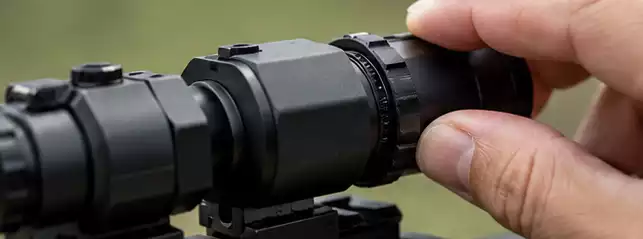
Some magnifiers have an adjustable diopter that helps users fine-tune perceived image sharpness. If the setting does not suit the observer or viewing conditions, the image may appear soft.
Follow the manufacturer’s instructions and make small adjustments. Also distinguish the target from the reticle: a soft target image and an irregular-looking dot may point toward different factors, although neither observation proves the cause.
Magnifiers without adjustable diopters offer fewer opportunities for individual adjustment, making their optical design and intended use particularly important during selection.
The Magnifier Introduces Its Own Optical Aberrations
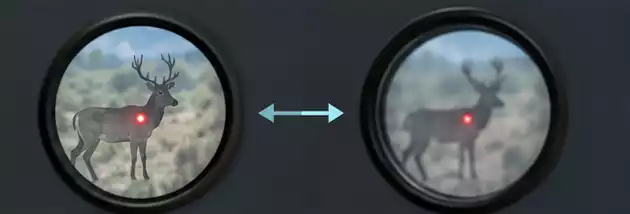
A magnifier does more than enlarge an image. Its optical design, alignment, and viewing position influence the final result.
Optical aberrations may reduce sharpness or affect fine details, particularly away from the center of the field. Magnification can also make irregularities in the original reticle more noticeable.
The key distinction is that the magnifier may reveal an existing limitation while also contributing its own optical effects. The complete system needs to be evaluated before either component is blamed.
Eye Position Is Not Ideal
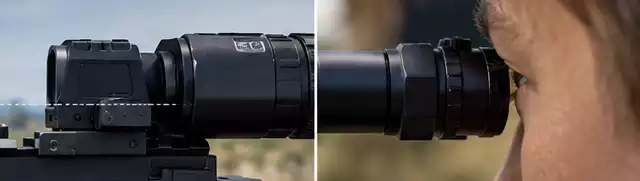
The usable viewing area behind a magnifier is generally less forgiving than viewing a red dot sight alone. Eye relief and the eye box determine how comfortably the full image can be seen.
If the eye is too far from the intended position or off-axis, the image may appear obscured or uneven. Position your eye within the manufacturer’s specified eye-relief range and look through the center of the viewing window.
If the image improves when your eye is centered, viewing position may be contributing to the problem.
The Dot Itself May Limit Image Quality
The emitter, optical design, lens system, and observer’s vision can all influence how a red dot appears.
A dot that looks acceptable at 1x may reveal irregularities when magnified. This does not automatically indicate a defect; magnification simply makes more detail visible.
A larger-looking dot also does not necessarily cover a proportionally larger area of the target. Magnification enlarges the apparent reticle and target together, so apparent dot size and actual target coverage are different considerations.
For more information, please read our related articles: Why Is My Rifle Scope Blurry at High Magnification?
How to Check Where the Blurry Image Comes From
A consistent comparison is more useful than changing several settings at once. These checks help narrow down possible causes without immediately replacing or dismantling an optic.
Check the Magnifier’s Focus Adjustment
If a diopter adjustment is available, follow the manufacturer’s instructions and make small changes. If the image remains soft, continue checking rather than assuming the optic is defective.
Compare the Red Dot With and Without the Magnifier
Observe the sight alone, then compare it with the magnifier in place under similar conditions.
- If the dot looks irregular in both configurations, investigate brightness, individual vision, and the sight itself.
- If it changes substantially with the magnifier, check focus, eye position, alignment, and optical characteristics.
- If the target looks soft but the dot remains sharp, distinguish target-image focus from reticle appearance.
This comparison helps direct further investigation but does not establish which component is faulty.
Check the Image Under Consistent Viewing Conditions
Keep lighting, viewing distance, eye position, and brightness as consistent as possible. A setting that works in bright daylight may produce excessive bloom in a dim environment.
Change one variable at a time so that each adjustment provides useful information.
Four Checks That Help Narrow It Down
- Ask another observer to compare the image. Different results may suggest individual visual factors, but do not prove that the optic is fault-free.
- Take a reference photograph if practical. Center a phone camera behind the optic and avoid excessive exposure. Phone optics and image processing introduce their own limitations, so a photograph cannot establish whether an optic is defective.
- Reduce brightness slightly. If spikes or fuzzy edges become less noticeable, excessive brightness relative to the environment may be contributing to bloom.
- Stabilize the viewing setup. A secure rest reduces unnecessary movement and makes comparisons easier.
These checks narrow the possibilities; they do not replace a controlled inspection when a problem persists.
Why Does the Dot Look Larger, Stretched, or Uneven?
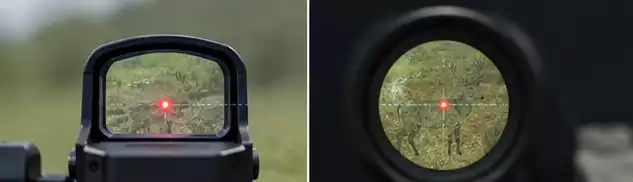
Not every change in appearance is a focus problem. Brightness and viewing geometry can also affect the image.
Brightness, Bloom, and Apparent Dot Size
When the reticle is brighter than the scene requires, its edges may appear to spread, producing a larger, softer-looking dot. This effect is commonly called bloom and can become more noticeable through a magnifier.
Lower the brightness until the dot remains easy to see without overwhelming the target. If the edges become more defined, brightness may have contributed to the problem. If not, investigate other factors.
Offset, Tilt, and Edge-of-Window Effects
An off-center dot in the viewing window does not necessarily mean the zero has changed. Mounting alignment, the relative position of the optics, and eye position can influence where the dot appears in the magnified field.
Looking near the edge of the field may also make image degradation or vignetting more noticeable. Tilt is a separate issue, and its practical consequences depend on the mounting arrangement and equipment.
If the problem began after installation, check the mounting arrangement against the manufacturers’ specifications. Do not assume that an uneven image alone proves a defective optic.
Is It a Defect, a Setup Issue, or a Mismatch?
A complaint about image quality can have several explanations. Separating them helps determine the appropriate next step.
| Category | Meaning | Next step |
| Defect | A component may not meet its intended specifications | Repeat controlled checks and arrange inspection if necessary |
| Setup issue | Focus, brightness, eye position, or mounting may be unsuitable | Verify settings and installation |
| Compatibility mismatch | The sight and magnifier may not perform as expected in the intended configuration | Check mounting requirements, eye relief, and product specifications |
When a problem first appears tells you where to investigate, not who is responsible. A problem that begins after mounting warrants checks for alignment and mounting stress, but timing alone cannot distinguish an installation issue from a latent defect.
Repeatable observations and appropriate inspection are more reliable than assumptions based on a single symptom.
What This Means for Brands: The Complaint That Was Never a Fault

For optics brands, selling a red dot sight and magnifier as a set means considering how the two products work together. Mounting requirements, eye relief, focus adjustments, and expected viewing characteristics all influence the user experience.
Clear product specifications and a concise troubleshooting card can help customers check focus, eye position, brightness, and the sight’s appearance without the magnifier before requesting support.
Adjustable diopter design is another selection consideration. It provides an additional way to fine-tune perceived focus, although its usefulness depends on the product’s design and adjustment range.
These measures do not eliminate genuine defects. They help distinguish setup questions from problems that require technical inspection, making product selection and after-sales communication more effective.
Conclusion: Get a Clearer View with the Right Optics
When a red dot looks different through a magnifier, identify the symptom before deciding what has gone wrong. A soft dot, star-like spikes, a doubled image, and a dot that shifts or changes shape can have different causes.
Compare the sight with and without the magnifier, keep viewing conditions consistent, and check focus, brightness, eye position, and compatibility. If the problem persists, consult the manufacturer or arrange an appropriate inspection.
Name the symptom before you blame the part. A careful comparison is the first step toward finding the right adjustment or product combination.
For help selecting compatible optical products or discussing customization requirements, contact our team to explore the available options.
FAQ
Why does my red dot look blurry only when the magnifier is on?
Focus settings, optical characteristics, and eye position can affect the image. Compare the sight alone with the complete setup before identifying a cause.
Does a magnifier make a red dot less accurate?
Magnification does not inherently change a correctly established zero. However, mounting or alignment problems can affect the setup. Image clarity and actual aiming accuracy are separate considerations.
Why does my dot look like a star instead of a circle?
Excessive brightness, individual visual factors, and optical characteristics may contribute. Lower the brightness and compare the sight without the magnifier before investigating further.
Why does the dot look bigger with a magnifier?
Magnification enlarges the apparent reticle and target images. Excessive brightness can also cause bloom, making the dot look larger and softer.
Should I return the magnifier or the red dot?
Check focus, compare both configurations, standardize viewing conditions, and verify compatibility first. If the problem persists, contact the manufacturer for troubleshooting or inspection.